Showing posts with label tech. Show all posts

Wednesday, April 01, 2009

+c

I bit the bullet. Took the leap. Faced the music. Peed in the wind.


I switched to Chrome (Dev Channel) as default browser.

Update:


I made my Chrome's launch icon --incognito.
I made my default browser registry setting as --incognito for http and https.
I made all the above changes on all the machines I use.

Some people do not like history. Some people do not like thumbnails. Some people do not like autocomplete for the URL bar. Some people like to type. 

Chrome developers, please provide a simple way to always open in incognito - and get a nice spot in heaven. Remember karma. Remember - 'Don't do evil'. ;)

Saturday, February 07, 2009

typing

[from wikipedia]


Recently, I read too many good articles on this topic and I thought I should write on it too due to its importance. :D

The keyboard is the most used input interface with the computer (even more than the mouse). So typing speed does matter.

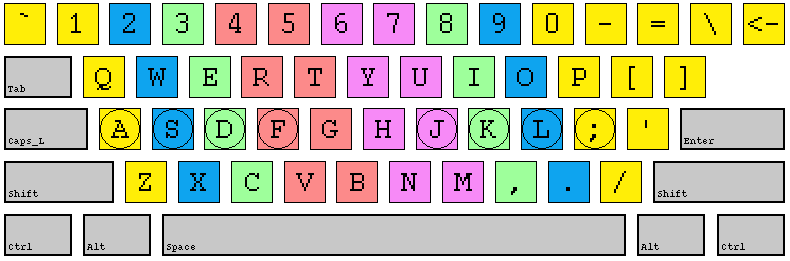
Touch typing is typing without the sight of the keys. Above is the layout of the zones for each finger (QWERTY). Some people can correctly touch-type fast without sticking to these zones. They have invented their own typing technique and would not want to change zones now. However, if they do, it would certainly boost their speed in the long run.

I always recommend touch typing to others. And sticking to the zones.

There should be enough sites to learn touch-typing and speed testing. And there is Typing of the Dead :D. For programmers, 70 rpm (as per Steve Yegge) should be achievable.

Recently, I found that I was using the wrong fingers for two keys and I am trying hard to switch - and it is turning out to be hard. The more you are used to, the harder it is to correct. So correct early. Use both hands for combination keys (ex: Shift key for caps). I think Typing 101 is a really good investment.

A difference of keys throws me off and for that reason I always dread the keyboard design in laptops (not to mention the difference from vendor to vendor).

I read about ergonomic keyboards which increase typing to some extent (and reduce muscle strain). I might look into one. But I would need to carry it around then. :D

I read about Dvorak Simplified Keyboard and I think it would have been a great experience to have used it. I would have been able to compare my speeds on both layouts. However, the inability to use the Ctrl X, C, V keys is a con. Which leads me to speculate that Dvorak keyboard is more for typists than programmers.

Again to reiterate. We are typists first, programmers second.


[Hat tip to Jeff Atwood, Steve Yegge]

Tuesday, February 03, 2009

Gmail with new ways to label mail

Gmail has heard me and have rolled out faster ways to label conversation. However, applying multiple labels to a conversation is still tedious.

I have mixed thoughts of the new look that comes with the buttons. It is an irony to Gmail's clean interface.

The simulation of 'folders with the move to' - I do not use it, so it does not matter to me. It is a little noise on screen. But it seems like a lot of people desire it for Gmail to have come up with a compromise. Update: On another note, if Inbox Zero is a great deal for you, this would be really helpful.

Saturday, January 31, 2009

Google's and gmail's malware and spam issues for today

Though this is not as scary, there is a lot of "hubbub" about it - Google marked my site as malware. It is obvious that it must have been a human error.

"We work with a non-profit called StopBadware.org to come up with criteria for maintaining this list, and to provide simple processes for webmasters to remove their site from the list.

We periodically update that list and released one such update to the site this morning.
Unfortunately (and here's the human error), the URL of '/' was mistakenly checked in as a value to the file and '/' expands to all URLs.
...
We will carefully investigate this incident and put more robust file checks in place to prevent it from happening again."
- Marissa Mayer

The original post from Google was updated (updated text in blue) and it looks like Google is trying (though it might not be intentional) to shift blame on StopBadware.org. 

It's not human error to include even junk input to a program. It's a human error NOT to check it though - URL '/' is a valid input in this case.

Almost 6 hours later, Gmail issues a statement saying that it uses Google's malware filters and mail might have went to spam.


Now this is scary because it happened to me (nobody searches my blog :P). Below is a cool thing though. I have a soft corner for Gmail's spam team - I think it is quite under-appreciated.

"We're working to roll out an automated fix to put these legitimate messages back into your inboxes, and we expect this to happen within a day. In the meantime, if you were expecting a critical message this morning, please check your spam folder. (We tune our spam filters well enough that ordinarily you should never have to check your spam folder.)"
- Gmail Blog

Thursday, September 11, 2008

checked exceptions (good or bad)

C# and Java differ in some aspects. One of it is Exceptions handling. C# does not have checked exceptions while Java does. Is it good or bad? So why are they bad?

People are lazy (I am). Due to checked exceptions, the burden is put on the programmer to think of those checked exceptions that would be thrown and explicitly duck or handle them. Not all would know all of them. It encourages empty catch blocks and that would catch a higher level exception like Exception or IOException and that defeats the purpose of checked exception. If C# had them, empty catch blocks would catch System Exceptions and that is a bad thing (catching Out of Memory exception for example). This was (one of) the reason why checked Exceptions were not included in C# by its chief Architect Anders Hejlsberg. 


[Hat tip to AN]

Saturday, September 06, 2008

Google Chrome review

Despite the launch of Chrome, I like Firefox too. Chrome is very light, simplistic and fast. My approach is if a browser does not piss you off after using it for a while, it should be good.

If I switch between tabs rapidly, one of the tab closes.


I should be able to double-click on the tab-bar (Chrome does not have one) to open up a new tab (like in Firefox). Especially in the above case, you have to look for the small '+' button.

Tearing off a tab into a new window and otherwise is good.

The way a tabs opens up next to the parent tab is good.

Good screen estate.

Very little options or control. I don't like history.


[Prone to update eternally]

Tuesday, September 02, 2008

Google Chrome

Google Chrome. I still have to read the whole comic book. I might put my take on it sometime. But it was worth blogging on this ironical day.

Thursday, August 28, 2008

Gmail Mobile (Blackberry) version 2.0 released

A new update for Gmail for Mobile (Blackberry) 2.0 was released (version 2.0.5.1262) today (update: for all J2ME phones on 10/23). A few notable features that I like.

Mobile drafts: The drafts that you save on mobile are not visible on Gmail (browser) and you lose them once you sign out or reset blackberry handheld. But draft is always good.

Outbox: Don't know yet. Mostly, when an email cannot be sent (due to absence of wireless connection), it would go to outbox and sent when the connection becomes available again.

Contacts: Browse through your contacts, email them and search through conversations or chats with just one click. Cannot edit though.

Multiple accounts: This is a sleek feature. Surprisingly, not available in Gmail (browser) but available in mobile. With this you can add another Gmail account, sign in and switch between them with just 3 clicks. If you use Firefox for Gmail, you would find this nice as you can't simultaneously sign into multiple accounts in firefox (without tweaks).

Notify me when there is new mail in my inbox (edit blackberry profile to customize notification): My personal favorite (someone read my email). You can customize notification in your blackberry profile for new email under 'Gmail - New mail'. I don't like 'vibrate + tone' mode for new emails but I do keep Repeat notification as Led flashing. Previous version of Gmail for mobile had a very annoying bug where on new Gmail mail, the led would keep on flashing (for a fixed time) even after been read on handheld. Now, once Gmail mobile application is opened or new Gmail mail is read or on Refresh in Gmail mobile, the led stops flashing. In blackberry's (work) messages, the led stops flashing only when read.

Update:
Basic offline support: As the recent emails are cached, reading emails with no coverage is possible.

Search: This is not an update for 2.0 but it is worth mentioning; all advanced search functions that are available in desktop gmail are also available in mobile (ex: is:chat, in:spam etc).


[Hat tip to Ionut]

Thursday, August 14, 2008

small glitch in Gmail browsing spam


A small glitch while browing the spam in Gmail. I guess nobody would have thought about it. But I was looking for mail in spam and directly sent to me (in:spam to:me) to see if anything important went to spam.

Is this causing the temporary 502 error? :D

Tuesday, August 12, 2008

Gmail down

When you build a good reputation, people are less forgiving to your errors. Acknowledging them is good. I did not have access for about 15 to 30 minutes yesterday.

From Gmail blog:
"In general, though, if you spot a problem with your Gmail account, please visit the Gmail Help Center and user group, where the Gmail Guides are your fastest source of updates."

Today morning, I got another 502 error this morning for a moment and then I was able to access my gmail within 5 minutes. However, the groups indicate that there are still people without gmail access for about 18 hours. Now, that's scary.

Tuesday, August 05, 2008

spell checker in search engines (Google)

Google offers/not offers a spell check on the below words for array.

012345678901
arrrrrrray
arrrrrrrray - not
arrrrrrrrray


I guess people do not make a mistake with word 'array' by incorrectly typing in 8 r letters.

Thursday, July 31, 2008

New automatic 'Blogs I'm following' label in Google Reader

I happen to see a new automatically created label in Google Reader 'Blogs I'm following' with the below message. Seems like a fairly recent feature as lifehacker, blogoscoped (Lenssen) or Google OS (Chitu) have not blogged about it yet.

The blogs you follow in Blogger have been added as subscriptions in Google Reader. You can manage the blogs you follow using the Blogger dashboard. Learn more


So Google made a guinea pig out of me? :D

update: got hat-tipped from Ionut

update: the recent feature Blogs I'm following

Friday, July 25, 2008

Suggest a feature for Gmail

Hopefully, someone would read this.
  • Instead of selecting labels from a dropdown, I should type and select labels from the dropdown (like contacts). 
  • A simple way to search unlabeled conversations and not by process of elimination (ex: is:unlabeled etc.).
  • Attachment sizes per conversation.
  • One button shortcut to delete an email (like e for archive). Easier to 'Delete Forever' emails in search results.
  • The conversation view in gmail is one of its best features. However, I would still like to see emails in non-conversational view.
  • Purge attachments from emails.
  • Selectively sign off from locations rather than sign off from all other locations. The same for google talk / talk labs too.
  • A way to disable 'Sponsored Links'. Or I will put words like death, tragedy in the signature of my emails.

Update: implemented in blue, not implemented in red
Note: prone to update eternally.